
For real estate agents
Your weekly market update. No filming.
Add this week’s numbers for your area. We write the script, your AI twin presents it with your face and voice, and you get a branded video, Reels and a stats image to post. You just approve it.
Your first one is on us: a 1-minute update plus a Reel, no card needed.
See a full
weekly update.
The full video for YouTube, Facebook or your website. Each number appears on screen as it’s said, with the agent’s name on screen and a closing card.
Stay in front of everyone who’ll buy or sell this year.
Most of your business comes from people who already know you. A short update every week keeps you on their feed, and shows you know your market better than anyone.
Look like the local expert
Prices, days on market, listings and rates for your area, explained in plain words: what it means for buyers and for sellers.
Show up every week
Finding the numbers, writing, filming and editing takes hours. Here it takes about five minutes, so you actually keep it up.
Turn views into calls
Every video ends with your name, phone and “Thinking of buying or selling?”, and your branding is on screen the whole time.
Four steps,
about five minutes.
Nothing is recorded until you’ve read the script and said go. Your name, brokerage, phone and logo are saved, so next week you only add the new numbers.
-
01
Add this week’s numbers
Your city or area, plus the numbers from your MLS or local market report: median price, days on market, listings, rates. Leave out any you don’t have.
-
02
Approve the script
A 1–2 minute update: what changed this week and what it means for buyers and sellers. It only uses the numbers you gave it. Change any line before you approve.
-
03
Your twin presents it
Your AI twin, with your face and voice, presents it. Your numbers, branding and closing card are added to the video.
-
04
Post it everywhere
You get the full video, vertical Reels for Instagram, TikTok and Shorts, and a branded stats image for a post or carousel.
What you get
every week.
One update, ready for every channel you post on.
- The update video
- Your twin talking through this week’s numbers, with your logo, name and phone on screen, the numbers shown while you talk about them, and a branded end card.
- Reels & Shorts
- Vertical clips with captions and your branding, ready for Instagram, TikTok, YouTube Shorts and Facebook.
- Stats image
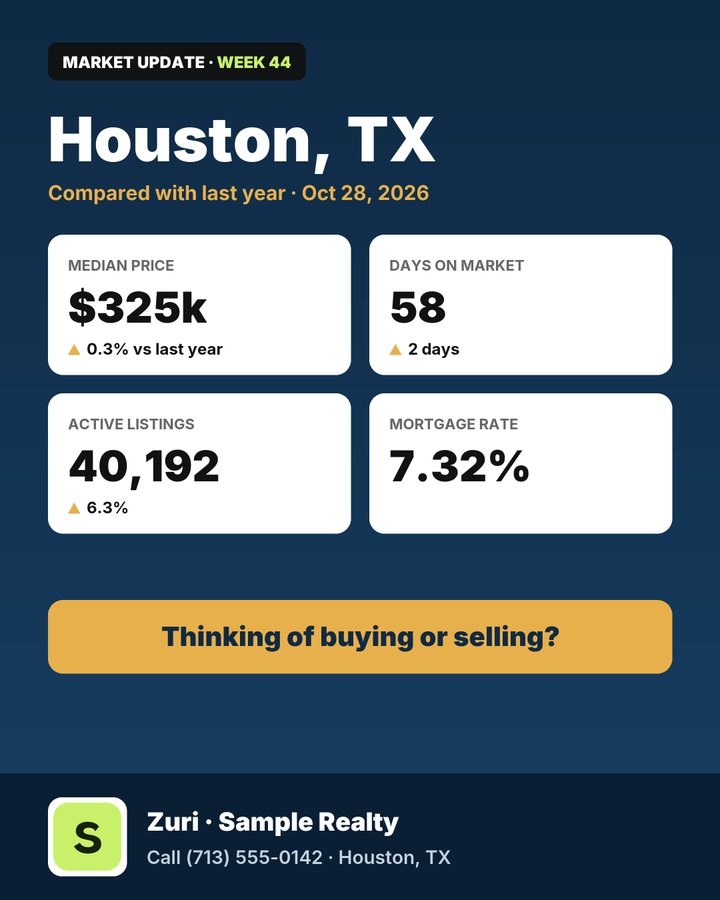
- This week’s numbers on a branded image, sized for Instagram and LinkedIn. Post it with the video or as a carousel slide.
- The script
- Yours to reuse as a newsletter, an email to past clients, or a caption.
Questions.
Anything else, email ayomide@skiplabinnovation.com.
Where do the numbers come from?
On Agent, from you: the numbers from your MLS or local market report, typed into a short form each week. On Done for you, we gather them from public market data (Redfin, HAR.com), or use your monthly MLS report if you send it. Either way, the script uses only those numbers. It never makes up figures or predicts prices.
Do I have to film anything?
Once. On Agent or Done for you, you record about 3 minutes of yourself reading a short script in the app, plus a short consent clip, and we make your AI twin from it. On Done for you, we walk you through it on a call. After that you never film again. You can also use one of our AI presenters instead.
Will it really look and sound like me?
Your twin uses your own face and voice. Make your free update first to see the quality, then decide. You approve every script before anything is recorded, and you can delete your twin anytime.
Can I use my brokerage’s logo and name?
Yes. Upload your logo once and it goes on every video and stats image, with your name, brokerage and phone. Please check your brokerage’s and MLS’s advertising rules, as you would for any post.
Can I make other videos too?
Yes, any topic: a listing tour, tips for first-time buyers, how to sell without moving twice. Just type the topic. Your 6 minutes a month are shared, so a 1½-minute listing video uses one week’s update. If you want to post more videos, or longer ones, there are bigger plans in the app.
How long does it take?
About five minutes of your time. The script is ready in under a minute. The video and Reels usually take 5 to 20 minutes after you approve, and we email you when they’re done.
How do I cancel?
From your billing page, anytime. You keep your plan until the end of the month you’ve paid for. See the refund and cancellation policy.
Make this week’s update free.
Add your numbers, approve the script, post it. No card needed.